
Screen: /en/account/billing
One screen for all eight products: what plan you are on, what you have used, what more would cost, and how to stop.
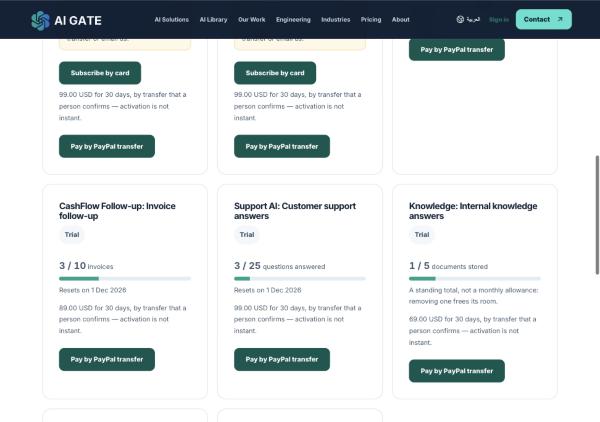
What each product counts
Each counts the thing its customer recognises as the work done — not an internal "run".
| Product | Counts | Resets |
|---|---|---|
| SEO Autopilot | scans | monthly |
| LeadFlow | enquiries | monthly |
| QuotePilot | quotations | monthly |
| CashFlow Follow-up | invoices | monthly |
| Support AI | questions answered | monthly |
| Knowledge | documents stored | never — a standing total |
| Reputation | reviews taken in | monthly |
| WhatsApp Sales | opt-ins | monthly |
Knowledge is the exception worth knowing: a library is something you keep, not something you consume, so its allowance is a standing total. Removing a document frees its room immediately, and the screen says so instead of showing a reset date that would be a lie.
There is no overage billing
When an allowance runs out, the next request is refused with the reason. Nothing is charged automatically, and nothing you have already stored is touched.
LeadFlow is the one deliberate exception, and it errs toward your customer: an enquiry past your allowance is still captured and flagged over allowance. A stranger's enquiry is not ours to discard to enforce our billing.
Paying
By bank or PayPal transfer. Press Pay by PayPal transfer and you get an exact amount and a reference. Put the reference in the payment note.
A person confirms every transfer before access starts. AI Gate never sees the money, so nothing you do — not requesting it, not pressing "I have sent the payment" — grants access by itself. Activation is not instant, and the screen says so rather than implying otherwise.
By card. Where card payment is offered it currently runs in test mode: real cards are declined and no money is taken. The screen says this above the button. Use a transfer to pay for real.
A product with no price configured says it is not on self-service purchase yet and gives an address, rather than showing a button that fails.
Current transfer prices
| Product | Per 30 days |
|---|---|
| SEO Autopilot | $99 |
| LeadFlow | $99 |
| Support AI | $99 |
| QuotePilot | $89 |
| CashFlow Follow-up | $89 |
| Knowledge | $69 |
| Reputation | $49 |
| WhatsApp Sales | not sold — see its guide |
Prices shown on the public product pages are planning figures. The amount on this screen is what you would actually send.
Stopping
Cancel this subscription is behind a disclosure that states the consequence before the button appears.
- It never takes effect immediately. A period you have paid for has been bought: access runs to the
end of it, with your full allowance, and the screen tells you the date.
- Nothing is refunded and the paid period is not cut short.
- Cancelling twice is the same as cancelling once.
- It can be undone while the period is still running — Keep it renewing. Once the period has
lapsed there is nothing to resume and you subscribe again.
If the payment provider cannot be reached, nothing is changed locally and you are told. Showing "cancelled" to somebody who goes on being charged is the one failure that costs real money.
Who can do this
Only owners and admins can start a checkout, request a transfer, or cancel. Members can read the plans screen.