
Screen: /en/account/invoices · Counts: invoices recorded this month
Three fixed reminder messages, one per stage, never repeated — and not one of them leaves without a person approving it.
What it is for
Chasing invoices is work nobody wants and everybody postpones, and the reason it is risky to automate is that an over-eager system damages a customer relationship permanently. This product's answer: the wording is fixed, each stage fires once ever, and you read every message before your customer does.
Recording an invoice
- Amount in the currency's smallest unit —
25000means $250.00. KWD4500means 4.500 KWD. - Your authorisation to follow up — required, and the point of the product. *An invoice being owed is
not by itself permission to chase someone. State the authorisation you actually hold, e.g. "Agreed in our signed services contract that we may email about unpaid invoices."* It is stored with the invoice and shown on every reminder.
- Show me each reminder before it is sent — leave this ticked unless you have a reason not to.
Importing a CSV
The first row is column names; the amount is in the smallest unit. Up to 500 rows, and every rejected row is named with the reason rather than silently skipped. Each row needs its own consent text.
The approval box is ticked by default on import: nobody has read those rows one by one, and the product would rather nothing went out unreviewed.
The approval queue
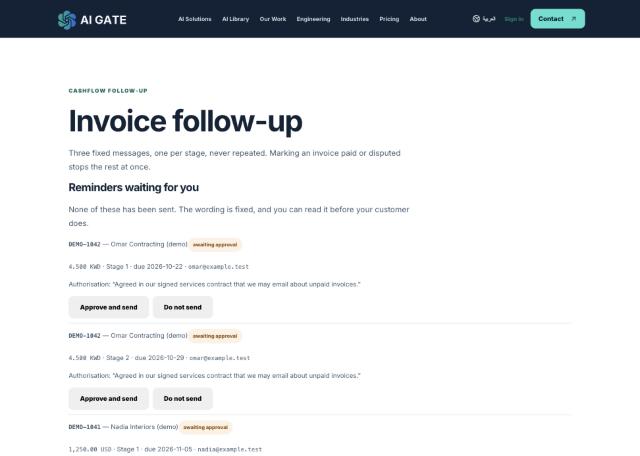
Each waiting reminder shows the invoice, the amount, which stage it is, the due date, the recipient and your own authorisation sentence.
- Approve and send — sends that one reminder, now.
- Do not send — closes it. That stage never fires again for that invoice.
Stopping everything
Mark paid or Mark disputed halts every remaining stage for that invoice at once and records why. A disputed invoice is a conversation, not a collections problem.
What it does not do yet
No accounting sync — Xero, QuickBooks and Zoho Books are not connected. Invoices are typed in or imported from CSV.
Watch out for
Stages are per invoice and fire once ever. If you decline stage 1, stage 2 still arrives on schedule; declining is not the same as stopping. To stop everything, mark the invoice paid or disputed.