
Screen: /en/account/leads · Counts: enquiries captured this month
LeadFlow gives you a hosted enquiry form on a link you can publish or embed. Every enquiry it captures keeps the exact consent sentence its sender was shown, and is scored against rules you wrote.
What it is for
You want enquiries from your website in one place, with enough information attached that somebody can decide who to call first — and with a record of what each person agreed to before you call them.
Publishing a form
Fill in Publish a form and press Publish form. You get a public link immediately.
- Form name — for you, not shown to the sender.
- The consent sentence the sender will see — you write this. The product supplies no default on
purpose: it is your promise to your customer, and it is stored with every enquiry so you can see later exactly what was agreed. Write what is actually true, e.g. "We will use these details only to reply to your enquiry. We will not add you to a mailing list or pass them to anyone else."
- Notification email — optional. Leave it blank and enquiries simply wait on the screen.
- Questions, one per line — format
key | label | type | required | comma,separated,options.
Types: text, email, phone, choice, boolean. Up to 12 questions.
  budget | Budget | choice | required | under 5k,5k-20k,20k+
urgent | Needed within a month | boolean | optional- Qualification rules — one per line,
key | operator | values. Operators:equals,not_equals,
in, is_true, is_present.
  budget | in | 5k-20k,20k+
urgent | is_true- Booking link — shown only to someone your rules qualified.
- CRM webhook URL and Signing secret — optional. Each enquiry is POSTed to your endpoint, signed
with your secret so your system can tell our request from anyone else's. The secret is stored encrypted and never shown again, so keep your own copy.
Do not re-add name, email and phone as questions. The form already asks for all three — it requires an email or a phone so you can reply. Adding them again just shows the sender two of each.
What the sender sees
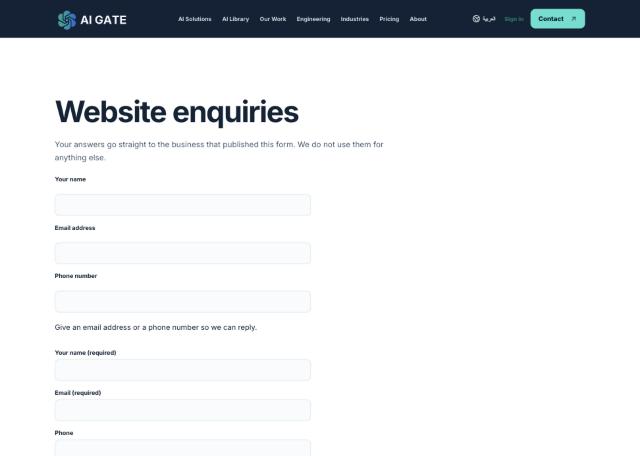
Your consent sentence sits above the button with an unticked box. It is never pre-ticked: a pre-ticked consent box is not consent.
Reading what arrives
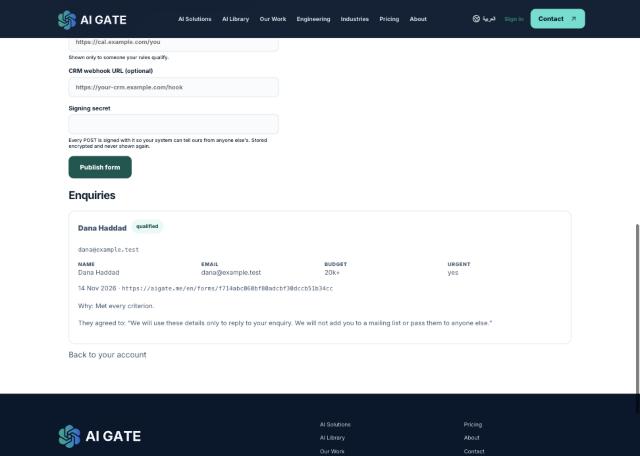
Each enquiry shows the answers given, the date, the page it came from, why it was qualified in plain words, and the consent sentence in quotation marks.
- qualified — matched your rules. Only these were offered the booking link.
- No badge — left unscored. With no rules, nothing is ever qualified by default.
- over allowance — past your monthly allowance. It is still captured. A stranger's enquiry is not
ours to throw away to enforce our billing; the flag only marks what is billable.
What it does not do yet
One-click HubSpot, Gmail or Outlook connectors. The signed webhook is the integration route today.
Known rough edge
A published form cannot be edited, renamed or deactivated from the screen, and the link is plain text you select by hand. Publish a second form if you need to change the questions.