
Screen: /en/account/answers (shared with Knowledge) · Counts: questions asked this month
Support AI answers your customers with sentences you wrote, returned word for word, with their source. Anything it has no written answer for goes to a person.
Read this first
There is no language model in this path. The product composes nothing, which is exactly why it cannot invent a refund policy — and also why it does not yet do what its name suggests. It retrieves and cites; it does not converse.
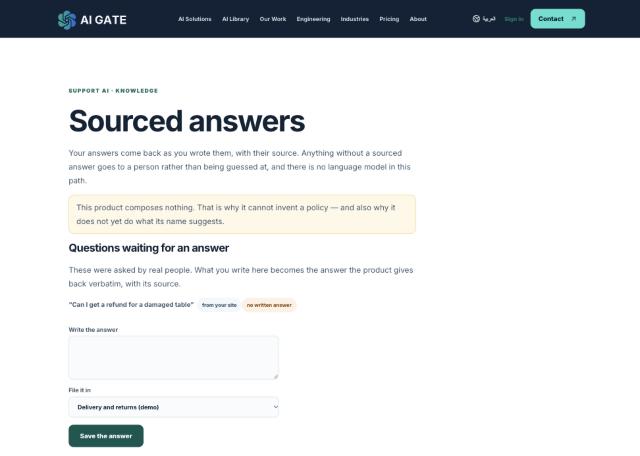
Step 1 — write some answers
Under Add a source by writing it, give the document a title, then questions one per line and answers one per line in the same order. Your answer comes back exactly as typed.
You can instead upload a document — .pdf, .docx, .txt or .md, up to 4 MB. It is split into passages, and an answer is a passage quoted exactly with its document and position named. We do not keep the file, only the extracted text, a checksum and the filename.
A scanned PDF is refused with a reason rather than stored as nothing readable. A scan is a picture of a page: there is no text in it to quote, and storing it would mean you only discovered that when an answer went missing.
Step 2 — try it
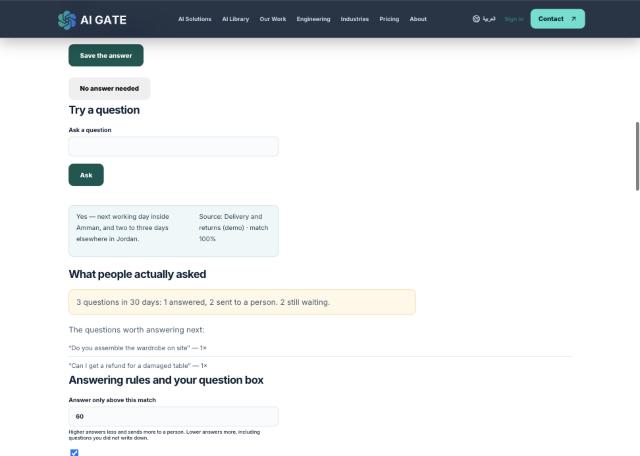
Use Try a question. You get the answer, its source document, and a match percentage.
Step 3 — open the question box to your customers
Under Answering rules and your question box you get a public link like /en/ask/<token>. Publish or embed it.
- The line visitors see above the box — your own wording.
- Answer only above this match — the threshold. Higher answers less and sends more to a person; lower
answers more, including questions you never wrote down. 60 is a sensible start.
- Where escalations go — an email address. Questions from the widget that find no answer are mailed
there, deduplicated within the hour.
- Issue a new link — the current one stops working at once. Use it if a link leaks.
Step 4 — the correction loop
Questions waiting for an answer are what real people actually typed. Write the answer, file it in a document, save — and from then on that question is answered verbatim. This is the loop that makes the product get better: your customers tell you what your documentation is missing.
No answer needed dismisses a question without writing anything.
Step 5 — the evaluation set
Fixed questions, each with the outcome you expect, so you can change the threshold and find out what stops being answered before a customer does.
Add questions that should be refused, not only ones that should be answered. A set made only of the second kind cannot catch a change that makes the system answer things it should not.
You can run the set against a different threshold without saving it.
Retention
Keep recorded questions for this many days — these are sentences real people typed into a public box and can carry names or order details. Blank means keep indefinitely. Answers you wrote from them stay in your documents either way.
Who a document may answer
Each document carries an audience, which you set on its row:
- Anyone — including your public question box. This is the default, and what every document was
before audiences existed.
- Members of this workspace — your own staff, never the public box.
- Owners and admins only — for anything a general member should not be answered from.
Narrowing it takes effect at once. A document withdrawn from the public stops answering them now, not at some later reindex. The rule is applied when candidate passages are searched, so a restricted document is unreachable rather than merely hidden from a list.
What it does not do yet
Reading a scanned PDF, and syncing a Drive or shared folder.